Drowning under repeated requests
When running a dynamic WordPress site, your growth likely arrives in small steps.
At the beginning everything runs smoothly, but the increasing requests gradually add pressure behind the scenes.
Until one day, during peak hours when you need speed most, your website starts to slow down. Dynamic pages like dashboards or checkouts pause long enough for logged-in users to notice.
Next thing you know, you just sit there watching pages keep stalling, while visitors hesitate and conversions wander off to your competitors.
A common cause of this slowdown is the large number of repeated database queries.
WordPress recreates many of the same objects on every request, and plugins often trigger identical queries across many page loads. During a spike, those same queries fire again and again until your database starts to run out of breath.
So what you need here is a way to avoid this repetition. A way to serve these queries instantly without hitting the database every time. That is exactly what persistent object caching provides, and Redis is the engine that powers it in most high-performance WordPress setups.
The limits of Page Caching, Transients and the built-in Object Cache
Before we get into how Redis can help, it is important to understand what WordPress already provides and why these tools fall short on busy, dynamic sites.
Page Caching only helps when pages look the same for everyone
Page caching speeds up public pages by serving ready-made HTML.
It removes PHP and MySQL from the request path, which is ideal for archives, product listings, and landing pages.
But it cannot help with dashboards, carts, checkouts, account pages, or anything personalised.
These pages must be generated fresh on every request, so WordPress still runs all database queries behind the scenes.
Transients fall back to the database without a persistent cache
Many developers use Transients to store temporary values.
They are useful, but only when backed by a persistent object cache.
Without Redis or another persistent backend, Transients are stored directly in the database.
This adds rows and increases query load, which hurts performance during traffic spikes. Instead of reducing pressure, Transients often make the bottleneck worse.
The built-in Object Cache is not persistent
WordPress includes an in-memory Object Cache.
It avoids repeating the same query more than once during a single request, which helps a little.
However, the cache is cleared the moment that request ends.
On the next page load, WordPress rebuilds everything from scratch.
For example, when a logged-in user opens their account dashboard, WordPress loads user data, recent orders, and various settings. The built-in cache holds this information only while that dashboard is being generated. If the next user opens the same dashboard a second later, WordPress repeats all the queries from scratch.
As your site grows, that constant regeneration becomes a real bottleneck.

It works a bit like a cashier building a receipt for one customer. When the cashier scans a pack of pasta, the system remembers that item’s price for each identical pack in that transaction, saving time by not rescanning the same item again.
But once the customer pays, the register clears the list. The next customer starts from zero, even if they buy the same items.
This is fine with a short line, but when the store gets busy, repeating the same scanning for every customer slows everything down and the queue grows fast.
Redis changes what the Object Cache can do
Redis does not replace the WordPress Object Cache. It powers it.
When Redis is available and correctly connected, cached objects are stored in memory across requests, not just within one request. That means WordPress can reuse the same objects for any visitor until the data is updated or invalidated.
This significantly reduces repeated queries, lowers CPU load, and keeps dynamic pages responsive even when traffic spikes.
Where you feel the difference
You see the real impact of Redis when your site relies on personalized or real-time interactions.
🛒 WooCommerce stores recalculate carts, coupons, and stock as shoppers move between steps.
🎓 LMS platforms load dashboards, progress data, and lesson availability for logged-in students.
🔐 Membership sites check access rules and user details on every page.
🖥️ Editorial teams work in admin screens that run hundreds of queries in the background.
Using persistent caching like Redis keeps all these dynamic areas responsive under pressure, so your site stays fast and stable exactly when it matters most.
So Redis solves the repetition problem.
But how does it actually pull that off behind the scenes?
How Redis efficiently handles and updates data
Redis stores whatever WordPress tells it to store. WordPress controls when data is created, reused, updated, or removed. Redis simply keeps these values in fast memory and returns them instantly on request. This gives WordPress a quick shortcut instead of repeatedly querying MySQL.
Here is a simplified flow of how it handles a request:
- WordPress triggers the object cache API
Whenever WordPress core, a plugin, or a theme callswp_cache_set(), the data is prepared for storage. - WordPress serializes and stores the value
WordPress converts the data into a storable format and saves it in Redis under a unique key. - WordPress later requests the same data
If the key exists in Redis, WordPress retrieves it from memory.
If it doesn’t, WordPress rebuilds the data from MySQL and saves a new version back into Redis. - When data changes, WordPress invalidates the old entry.
Most updates to posts, products, users, and options trigger WordPress to delete or overwrite related cache keys, using cache groups tied to that data. - Redis stores the updated version.
On the next request, WordPress rebuilds the fresh data, stores it in Redis, and serves the updated result instantly.
Redis is never the source of truth. The database always is.
Redis only holds fast, temporary copies that help WordPress respond much faster.
Here is a simple diagram that shows how Redis changes the way WooCommerce handles object caching compared to the default WordPress behaviour.
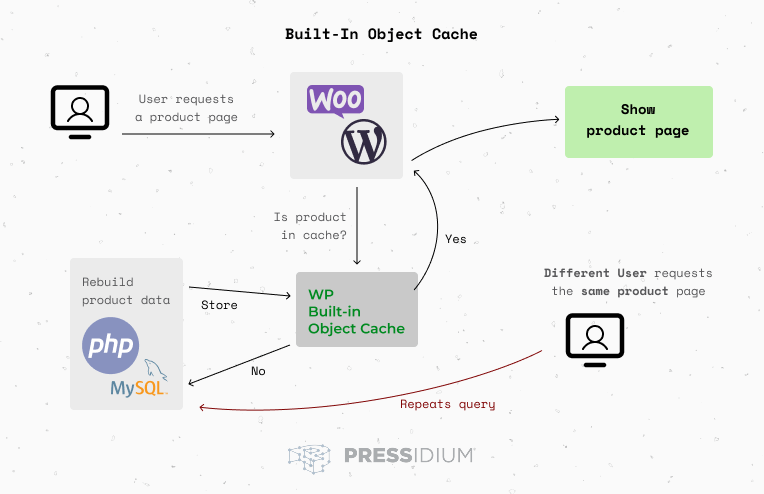
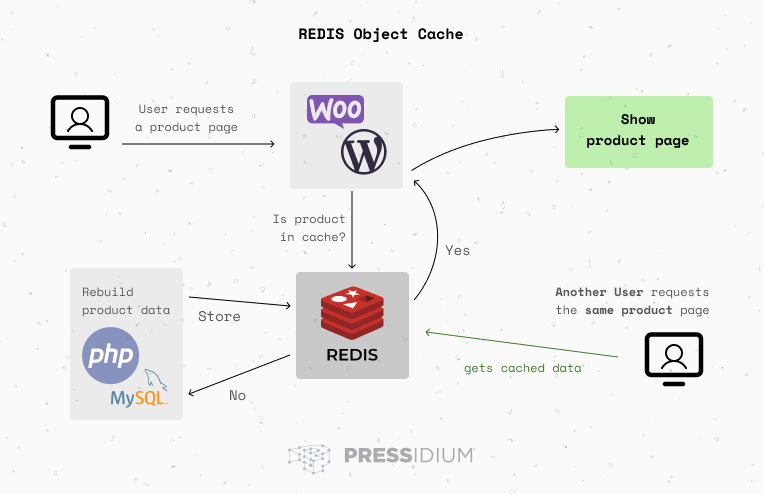
As you can see, when Redis object caching is active and a visitor opens a product page, WordPress checks if the required data already exists in Redis. If it does, Redis returns that cached object immediately. This means the system does not run the usual database queries. The cached data can come from any previous visitor, as long as it has not been invalidated. The page loads much faster because the request never touches the database.
Now that you understand how Redis works and why it matters, let’s look at how you can bring these gains into your own site.
How to enable Redis on your site
Enabling Redis comes down to two things: having Redis available on the server and letting WordPress use it safely. How you do that depends entirely on your hosting environment.
Most site owners never touch a command line. They rely on their host to provide Redis support and use a plugin to connect WordPress to it. Teams that run their own infrastructure take a more technical route, but this only makes sense when you fully control your server stack.
The simplest path: Use a Redis WordPress plugin
For the majority of users, this is the straightforward option. Choose a Redis plugin from the WordPress directory, install it, and activate it. Popular options include Redis object cache and WP Redis.


Once activated, the plugin creates the required Drop-In file and attempts to connect to the Redis service running on your host.
The Drop-in file sits in wp-content folder as object-cache.php and routes all cache requests to Redis, letting WordPress store and reuse data across requests.
If your hosting provider supports Redis, this handshake succeeds instantly and WordPress begins storing cached objects in memory across requests.
This method works because the plugin acts as the bridge between WordPress and the Redis service. It handles the connection, the drop-in, and basic cache operations with minimal setup on your side.
If you manage your own server
Some teams prefer to install and run Redis themselves. This works, but it requires serious commitment. You need proper server access, memory planning, isolated key spaces, PHP extensions, ongoing updates, and monitoring during traffic spikes.
Self-installation makes sense only when you run your own infrastructure and have the expertise to maintain it. For everyone else, it adds complexity without meaningful benefits.
Why platform-level Redis matters
Most WordPress users only want one thing: consistent speed without breaking anything. But Redis only works well when the hosting environment provides it natively. Otherwise, you deal with plugin errors, unstable connections, and configuration gaps that often cancel out the performance benefits you are trying to gain.
That is why Redis works best when it is handled at the platform level.
There are no plugins to manage and no server configuration to worry about.
You simply get a stable, persistent cache that keeps dynamic pages fast on every request.
And this is exactly how Pressidium approaches Redis.
How Pressidium implements Redis object cache
Pressidium delivers Redis as a fully managed, platform-level feature. You do not install Redis yourself. You do not provision servers. You do not maintain services. Our DevOps team operates the Redis infrastructure and ensures it remains stable, isolated, and optimized for WordPress workloads.
Redis Object Cache is activated at the platform level through the Pressidium Dashboard. Once enabled, WordPress automatically uses Redis to store and retrieve cached database objects in memory.
Redis works as part of Pressidium’s adaptive caching system and complements full page cache rather than replacing it. Pressidium EDGE adds a global delivery and control layer on top. The result is a unified performance stack that reduces database load, stabilizes TTFB, and keeps dynamic pages responsive under real traffic.
What Redis does inside Pressidium
Redis stores frequently requested WordPress data directly in memory. This includes options, queries, transients, and reusable objects that would otherwise hit MySQL repeatedly.
By serving this data instantly, Redis significantly reduces database strain and improves backend response times. This is especially important for logged-in users, WooCommerce sessions, membership sites, LMS platforms, and admin dashboards where full page cache cannot apply.
Where Redis fits into Pressidium’s stack
Redis is one part of a broader performance system.
Pressidium combines hot memory cache, warm SSD cache, persistent object cache via Redis, and Edge caching. Each layer accelerates a different part of the request lifecycle. Redis optimizes backend execution. Hot cache and Edge optimize delivery. Together, they create a stable and predictable performance profile even during traffic spikes.
Zero setup. Full control.
As a Pressidium customer, you can find all cache-related settings in your Dashboard and the wp-admin area.
You can:
- Enable or disable the Redis object cache
- Purge the object cache at any time
- Clear the full page cache, CDN cache, or all caches together
- Purge individual URLs when updating specific pages or assets
- Create URL and cookie-based cache exclusions for dynamic content such as carts, profiles, LMS dashboards, and multi-language user pages
- Monitor HIT, MISS, and BYPASS activity with our Analytics so you always understand how your cache behaves.
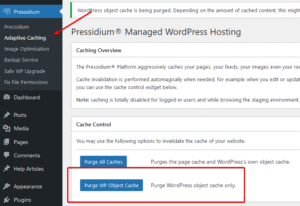
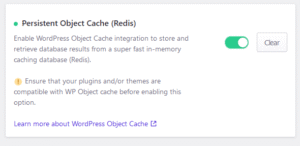

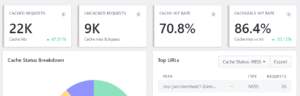
Redis supports your site on every request, while Pressidium maintains the reliability, speed, and visibility you need. The entire caching stack works quietly in the background. You get a stable, high-performance WordPress experience without manual tuning, plugin conflicts, or unexpected slowdowns.
A unified performance stack that removes your biggest bottlenecks
Redis cuts down database load and keeps dynamic pages fast under pressure. Pressidium EDGE accelerates delivery across the globe, reduces latency, and blocks harmful traffic before it reaches WordPress. Combined, they eliminate the slowdowns that damage conversions and reduce trust.
No more:
- Slow database queries
- Heavy WooCommerce sessions
- Overloaded dashboards
- Repeated backend calls
- Logged in traffic spikes
Most hosts rely on plugins and guesswork. Pressidium integrates Redis and Edge directly into the platform, so both technologies work as one intelligent system. You get stable TTFB, consistent performance, and stronger protection without managing servers or maintaining extra tools. No maintenance. No tuning. No surprises.
If you want Redis to deliver real results, you need an environment that unlocks its full potential. Pressidium provides the complete, ready-to-use performance stack that makes it happen.
Experience the Pressidium difference
If consistent speed matters to your WordPress site, Redis and Pressidium EDGE already give you a clear advantage. The next step is simple. Move to a platform engineered to remove bottlenecks instead of adding them. Pressidium delivers a full performance and security stack, supported by DevOps experts who keep your site running at peak speed.
You get fast responses, strong security, and the reliability your business can trust.
Spin up your site on Pressidium and feel the difference within minutes.
Get your free trial today and feel how smooth WordPress can be.
Your future self will thank you.
Start Your 14 Day Free Trial
Try our award winning WordPress Hosting!





⬇️PDF: Redis only delivers results when the hosting platform supports it properly.
If you are comparing providers, this checklist helps filter real infrastructure from marketing claims.
⬇️PDF: See the full range of server-side performance optimizations, including full page caching, OPcache, PHP 8+, database tuning, HTTP compression, scaling, and high availability infrastructure.
Frequently asked questions
Yes. WooCommerce gains significant speed benefits from Redis because it reduces the database load behind carts, sessions, and other user driven actions. Every cart update, product view, and checkout step triggers multiple queries that can overwhelm MySQL during traffic spikes. Redis stores these frequent lookups in memory so WooCommerce can respond instantly.
This message usually appears when a Redis plugin cannot connect to a Redis server. Most hosting providers depend on plugins and manual configuration, so misconfigurations are common. At Pressidium, this issue does not occur because Redis is a built-in platform service. We manage the Redis instance, the connection layer, and the integration with WordPress. All you have to do is enable it through your dashboard with one click.
Yes. Redis reduces the repeated work WordPress performs when generating dashboards, profiles, checkouts, and any page that cannot be statically cached. WordPress normally rebuilds the same objects on every request. Redis keeps these objects in memory and makes them available across requests, so WordPress skips unnecessary queries. The result is smoother dynamic pages and less strain on the database as your site grows.
No. Page caching and object caching solve different problems. Page caching accelerates complete HTML pages, while Redis accelerates the data WordPress uses to build those pages. Both systems work together. On Pressidium you gain page caching on Hot and Warm storage plus persistent object caching through Redis. This layered approach delivers consistent performance, stable TTFB, and faster dynamic content.
Yes. These platforms use many queries to handle logged-in sessions, progress tracking, and personalized content. Redis reduces this load and makes these dynamic areas more responsive. Pressidium configures Redis safely, isolates it per site, and manages all security controls. Your application benefits from higher speed with no manual tuning.
Usually no. Redis sits below the plugin layer and stores object data that WordPress generates. Most performance plugins focus on assets, minification, or database cleanup. Pressidium also integrates Redis directly with our caching engine, so the risk of conflict is minimal. If a plugin behaves unpredictably our DevOps team can review it and ensure Redis continues to operate correctly.
Redis depends on correct installation, persistent storage handling, security configuration, and tight integration with WordPress. When these parts are not aligned, Redis can disconnect, flush unexpectedly, or fail under load. Pressidium manages the full Redis stack inside the platform, with monitoring, tuning, and high-performance defaults. You get the speed benefits without managing servers or troubleshooting plugin errors.
Traffic spikes often overwhelm the database with repeated queries. Redis absorbs that pressure by serving cached objects instantly from memory. This stabilizes TTFB, protects the database, and keeps dynamic pages usable. When combined with Pressidium Edge caching and edge-layer request handling, your site maintains consistent speed even when traffic increases suddenly.
No. Redis is a platform-level component on Pressidium and works without plugins. You simply enable the feature from your Dashboard. Our DevOps team manages the service, tunes it for your site, and ensures it operates reliably. This avoids the typical plugin errors and handshake issues found on other hosts.
Yes. Pressidium gives you complete control from the Dashboard. You can enable or disable object caching, purge the Redis cache, or clear specific cache layers. This sits alongside your page cache, CDN cache, and URL or cookie-based exclusions. These tools let you refine cache behaviour without touching configuration files or server settings.