Why we measured WooCommerce wp-admin performance
If you run a WooCommerce store, most of your working day happens in wp-admin – orders, products, coupons, customers – not on a cached homepage that scores well in PageSpeed Insights.
Most WooCommerce performance benchmarks focus on the storefront.
This one looks behind the scenes at the admin workflows that WooCommerce operators use every day to run the store.
More specifically, it focuses on how hosting CPU generation affects the part of WooCommerce that store operators actually use throughout the day.
This article documents the evaluation that informed our decision to migrate Premium Site plans to Next-generation Premium Site plans CPU.
It explains what we measured, how we tested, what the numbers mean for merchants, and what they do not prove.
Benchmark summary (setup and results)
We built a repeatable benchmark that walks through a full WooCommerce admin session and records how long PHP spends on each request.
We installed a WooCommerce test store on a Pressidium® Premium Site 1 plan and ran a CPU evaluation comparing:
- the current Premium Site plans CPU
- the next-generation Premium Site plans CPU.
The numbers below are the results of that evaluation, not a forecast.
Across the full WooCommerce admin workflow, we found:

Mean server-side PHP runtime was 19.8% lower on Next-generation Premium Site plans CPU.*

The largest single-step gain we measured was WP Admin Dashboard (28% lower mean PHP runtime).*
* For setup and measurement details, see Methodology below.
Key findings from our CPU evaluation
The table below puts the headline results in context.
| Key findings | Current Premium Site CPU | Next-generation Premium Site CPU |
|---|---|---|
| Workflow mean PHP runtime | 757 ms | 608 ms |
| Overall change | – | 19.8% lower |
| Largest improvement | WP Admin Dashboard | 28% lower |
| Benchmark focus | WooCommerce wp-admin workflows | Not frontend pages |
Biggest gain in mean PHP runtime: WP Admin Dashboard (A3) from 730 ms to 526 ms, 28% lower. These improvements were observed across the complete benchmark workflow rather than a single synthetic request.
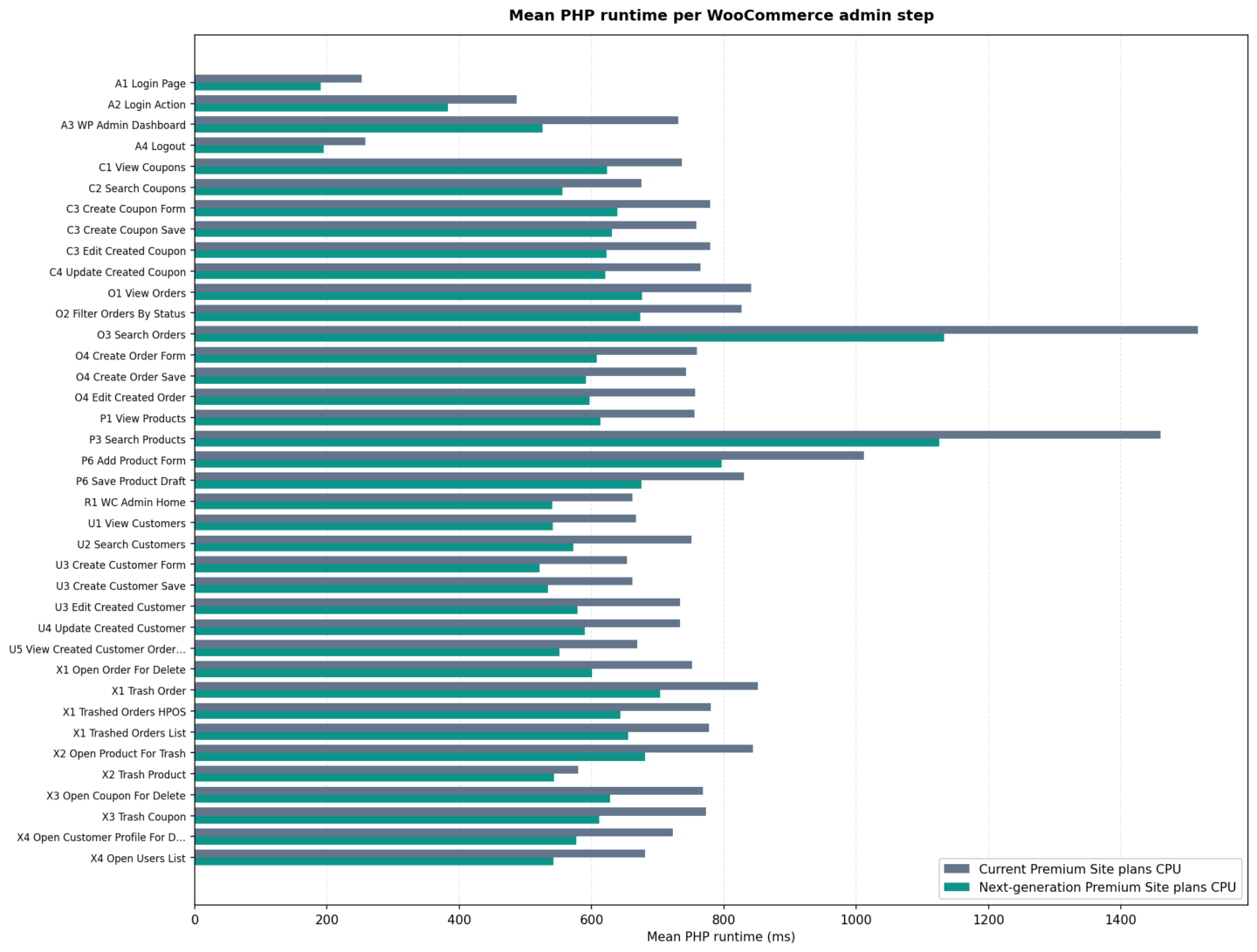
php_runtime_ms per benchmark step (sampler), comparing Current Premium Site plans CPU and Next-generation Premium Site plans CPU. Fifty iterations per stack; single virtual user. Full methodology.Note: These figures come from php_runtime_ms: milliseconds of PHP execution reported by our origin via the X-PHP-Runtime-Ms response header. That isolates server-side PHP time from k6 pacing, network latency, and browser rendering, unlike k6’s end-to-end http_req_duration alone.
The script still waits 2 seconds between most admin steps in dev mode (see pacing).
That delay is not included in php_runtime_ms.
Why homepage scores miss the work you actually do
Lighthouse and PageSpeed-style tests are useful for frontend WooCommerce performance. They often hit cached pages, edge delivery, and front-end metrics.
They tell you little about uncached, PHP-heavy admin screens: loading the order list, saving a product draft, or searching customers.
That gap matters in managed hosting built for demanding stores.
So we benchmarked wp-admin for this evaluation, not the shop front. Frontend flows (view product, add to cart, and similar) are on our roadmap as a separate benchmark (see What’s next).
What this means in the admin UI
The benchmark follows a realistic merchant path. Each row below is a labelled step in our test script (the sampler tag in the exported data shown in Figure 1 above).
| Area | What you do in the store | Why CPU shows up |
|---|---|---|
| Auth (A) | Login, dashboard, logout | Session bootstrap, capability checks |
| Analytics (R) | WooCommerce admin home | WC + WordPress bootstrap on admin screens |
| Orders (O) | List, filter, search, create order, add note | Heavy queries and meta writes |
| Coupons (C) | List, search, create, update | Similar admin CRUD load |
| Customers (U) | List, search, create, edit, orders tab | User management + related queries |
| Catalog (P) | Product list, search, draft product | Large tables, revisions, product meta |
| Cleanup (X) | Remove test entities | Deletes/trash; still PHP-bound |
Selected steps (mean PHP runtime, ms)
| Step | Current | Next-gen CPU (evaluation) | Improvement |
|---|---|---|---|
| A3 WP Admin Dashboard | 730 | 526 | 28.0% |
| O3 Search Orders | 1,516 | 1,132 | 25.3% |
| P3 Search Products | 1,460 | 1,126 | 22.9% |
| O1 View Orders | 841 | 677 | 19.6% |
| A2 Login Action | 487 | 383 | 21.4% |
| R1 WC Admin Home | 662 | 540 | 18.4% |

Search and dashboard steps tended to show the largest gaps, exactly the kind of work store managers notice when a host feels “snappy” or sluggish.
What faster wp-admin means for merchants
While benchmarks focus on milliseconds, merchants experience them as interruptions to everyday work. Faster admin screens can reduce friction across common operational tasks:
⬆️ Orders load sooner, helping teams process customer requests more efficiently.
⬆️ Product edits complete faster, which is especially valuable during promotions or catalogue updates.
⬆️ Customer and order searches feel more responsive, reducing time spent waiting for administrative tasks.
⬆️ Dashboard navigation becomes smoother, improving the overall experience for staff who spend hours each day in wp-admin.
The benchmark does not measure employee productivity directly, nor does it predict specific time savings.
It does show that the underlying server-side PHP work behind these actions completed more quickly on Next-generation Premium Site plans CPU.
The benchmark store (real anonymized e‑shop)
Pressidium research is always focused on providing real solutions for real problems. There is no meaning on benchmarking a vanilla WooCommerce site. Our intention is to show real-life WooCommerce admin performance on a store as it actually runs, not a stripped-down “benchmark special” we optimised for this article.
With the store owner’s and developer’s agreement, we took the site as it was:
- Full plugin stack (44 active, 30 inactive, 11 must-use)
- ~29.7k products
- ~26.7k legacy orders
and years of operational data.
We did not enable WooCommerce tweaks, drop plugins, or slim the database to make wp-admin look faster.
We did not delete rows or disable extensions.
After capture, we anonymized fields (customer names, product titles, post content, and similar) to a neutral xxxxx pattern for publishing.
Worth mentioning
Workflow.
The admin path in our k6 script was defined with the store owner, so the run reflects how that business uses WooCommerce admin day to day.
Why HPOS being off matters.
Many teams would enable WooCommerce High-Performance Order Storage (HPOS) before a public performance test.
On this store, HPOS was still disabled; orders remain on legacy shop_order posts. That is deliberate proof we measured the merchant’s real configuration, not a hosting vendor’s “best case” setup.
What we do not publish.
The store’s identity, URLs, or custom branding; individual plugin names; or Pressidium origin tuning (object cache, opcode cache, and similar settings were held constant and are out of scope here). Only the CPU generation under test changed between the two runs.
Performance audits on Pressidium. This kind of “as-operated” picture is what we aim for when we performance-audit sites for our clients: Understanding how WooCommerce, plugins, and data shape admin and frontend work before anyone tunes hardware or caching.

If you host with us and want the same lens on your store, contact our Sales Team or your account channel to discuss a performance audit.
Store snapshot (2026-05-29)
| Snapshot date | 2026-05-29 |
| Site | Single site (not multisite) |
| Theme | Child theme developed with WordMart |
| WordPress | 6.9.4 |
| WooCommerce | 10.5.3 |
| High-Performance Order Storage (HPOS) | Disabled |
| Order storage | Legacy (shop_order posts) |
| Products (non-trash) | 29,700 |
| Product types | 28,309 simple · 1,376 variable · 15 bundle-style |
| Product categories | 388 |
| Coupons | 223 |
Customers (customer role) | 38,771 |
| Orders (total) | 26,721 |
| Media attachments | 130,466 |
| Active / inactive / must-use plugins | 44 / 30 / 11 |
| Public web directory | ~7.8 GB |
| Database footprint (on disk) | ~4.2 GB |
Order status mix (legacy orders):
wc-completed(22,708)wc-cancelled(3,153)wc-refunded(723)wc-processing(111)
and smaller counts for on-hold, failed, pending, and trash: typical long-running store history, not a greenfield site.
Together, that is why searches, order lists, and dashboard screens in the benchmark hit large tables and real metadata, the kind of load you see on a mature e‑shop, not an empty admin install.
Methodology
We ran the same k6 script against the same WordPress + WooCommerce configuration on two origin hardware profiles: the current Premium Site plans CPU and the next-generation CPU we evaluated for rollout. The only intentional variable was the hardware generation under test.
Test environment
| Component | Value |
|---|---|
| Hosting profile | Real WooCommerce eshop on Premium Site 1 |
| WordPress | 6.9.4 |
| WooCommerce | 10.5.3 |
| PHP | 8.4 |
| Platform | Pressidium managed WordPress hosting (origin + Pressidium EDGE) |
| Origin stack tuning | Identical Premium Site 1 configuration across both CPU runs |
| Iterations | 50 full admin workflows per hardware stack |
| Virtual users | 1 (no concurrent admins) |
| Pacing between most steps | 2s after each admin page visit (K6_DEV_MODE=true) |
| Between full iterations | WP_ADMIN_ITERATION_SLEEP_SEC (default 2s) |
| Static assets | Not fetched (admin HTML/API only) |
PHP runtime header (X-PHP-Runtime-Ms)
Our headline metric, php_runtime_ms, is read from the X-PHP-Runtime-Ms HTTP response header: milliseconds of PHP execution for that request, measured on the server before the response is sent. That is why it excludes k6 pacing, TLS, and network latency.
If you run the open benchmark on your host, you need the same instrumentation: a small PHP auto-prepend script that records execution time and sets the header (find the prepend script at the repo’s PHP runtime header setup).
Verify with curl -I against /wp-admin/ before comparing CSVs. Without the header, k6 still runs but php_runtime_ms rows stay empty.
k6 pacing between steps
The benchmark script (wp-admin-flow.test.js) calls humanSleep() after almost every visitAdminPage() (and equivalent create/update helpers), before the next HTTP request.
function humanSleep() {
  if (config.devMode) {
    sleep(2);  // K6_DEV_MODE=true
    return;
  }
  sleep(randomIntBetween(config.sleepMinSec, config.sleepMaxSec));
}
For our runs:
K6_DEV_MODE=true→ a fixed 2-second pause after each covered step (~28 calls per full iteration when optional branches run).WP_ADMIN_SLEEP_MIN/MAX=0→ relevant only when dev mode is off (random sleep between min/max). It does not remove the 2s dev-mode pause.
Where humanSleep() does not run: cleanup steps (X1–X4), logout (A4), and the HTTP calls inside runCleanup(); those requests run back-to-back. A separate sleep applies between full workflow iterations only.
Why this does not skew the CPU comparison: php_runtime_ms is read from the response of each request. The 2s wait happens on the k6 client after that response is received. Both hardware stacks used the same script and the same pacing, so PHP times remain comparable. We do not use k6 row timestamps or total wall-clock session time in the results. The headline metric is server-side PHP execution only.
What we measured
- Primary metric:
php_runtime_msfromX-PHP-Runtime-Mson each admin HTTP response. - Not used for CPU comparison: client-side
http_req_duration, k6 export timestamps, or total wall-clock session time (network, TLS, andhumanSleep()pacing are separate from origin PHP work).
Workflow guarantees
- Real wp-admin URLs and WooCommerce screens, not synthetic
/pingendpoints. - Production-shaped store: anonymized live data and full plugin stack (see The benchmark store); no catalog stripping for the baseline.
- State-safe: the script creates temporary orders, products, coupons, and customers during each run, then removes them so the anonymized store is left clean after every iteration.
- Same script, same plugins, same PHP version; only the origin hardware generation changed.
Aggregation
- Workflow mean: average of per-step mean
php_runtime_msacross all steps in the script. - Per-step improvement %:
(current − next) / current × 100on step means. - “19.8% lower” refers to that workflow mean comparison (exact measured mean across all steps); “up to 28%” on an individual step refers to WP Admin Dashboard (A3) step mean.
Reproducibility (open methodology)
The benchmark is open source: k6 script, Docker setup, CSV export, and step-by-step notes live in our wordpress-cpu-benchmark repository on GitHub. Clone it, point .env at your WordPress + WooCommerce site, and compare php_runtime_ms per sampler on your own stack.
This article documents the workflow, metrics, and aggregation rules we used for the Pressidium evaluation. For step names that match the figures above, see the repo’s README-TEST.md (e.g. O1 View Orders, A3 WP Admin Dashboard).
What this benchmark proved
What the evaluation showed
On a Premium Site 1 plan, production-shaped store, Next-generation Premium Site plans CPU lowered mean PHP runtime on a defined WooCommerce admin workflow compared with Current Premium Site plans CPU (see methodology).
What we decided next
Those results completed our CPU evaluation for Premium. A phased migration of Premium Site plans to Next-generation Premium Site plans CPU is planned; not every site is on new hardware yet.
What the numbers should not be stretched to mean
- “Fastest WordPress hosting,” or proof that the shop front or checkout is faster. We measured wp-admin only (a frontend benchmark is planned).
- The same % on every store: plugins, catalog size, and custom code differ.
- Total “feel” at the keyboard: the script waits 2s between most steps; we report PHP time per request, not pauses between clicks.
- A fixed % on every click the day you migrate.
- That your Premium site already runs on next-generation CPU before your migration date.
Built for WooCommerce-heavy sites
Premium Sites are designed for single, resource-demanding workloads.
On origin, every site runs with no CPU throttling and Redis object cache included, so PHP workers are not fighting arbitrary shared-host CPU caps during admin and checkout work.
👉 Explore Premium plans


If you run a demanding store and want to discuss capacity, architecture, or plan fit, contact our sales team: engineers who can answer sizing questions directly.

Want the WooCommerce-specific view? See how Pressidium supports demanding WooCommerce stores.
What’s next
The wp-admin numbers in this post are the outcome of our CPU evaluation on Premium Site plans. Based on those results, a phased migration to Next-generation Premium Site plans CPU is planned.
If you are on a Premium plan and want to discuss what rollout means for your store, contact our Sales Team.
Frontend benchmark (planned)
Admin work is only part of the WooCommerce story. We are designing a separate benchmark for frontend flows (for example viewing a product, adding to cart, and related shopper paths), not wp-admin. It will use the same kind of disciplined methodology (php_runtime_ms where applicable, clear scope, published steps when ready).
Help us prioritise: if there is a specific flow that matters for your business (custom checkout, B2B catalog, subscription renewals, etc.), tell us what you would like measured. Customer input will shape which frontend scenarios we build first.
Summary
Homepage benchmarks do not tell the full story for WooCommerce operators.
Our CPU evaluation on Premium Site 1 plan infrastructure showed 19.8% lower mean PHP time across the full admin workflow on Next-generation Premium Site plans CPU vs Current Premium Site plans CPU, with WP Admin Dashboard (A3) up to 28% lower in mean PHP runtime.
That evaluation informed a planned, phased migration of Premium Site plans to next-generation CPU.
👉 Run the same workflow yourself: wordpress-cpu-benchmark on GitHub.
A frontend benchmark is planned next.
👉 Contact us if you want a specific shopper flow included.
Methodology note
- Test run used a single virtual user and a full WooCommerce wp-admin workflow.
- The primary metric was
php_runtime_ms, collected from theX-PHP-Runtime-Msresponse header, which measures server-side PHP execution only and excludes k6humanSleep()pacing. - Each hardware stack was tested across 50 iterations. Runs used
K6_DEV_MODE=true, with a 2-second pause after most steps. - The environment used WordPress 6.9.4, WooCommerce 10.5.3, PHP 8.4, and a Pressidium Premium Site 1 plan.
- The CPU evaluation compared Current Premium Site plans CPU with Next-generation Premium Site plans CPU.
- Results apply to the tested wp-admin workflow, not frontend or checkout performance.